In 2008, my three friends and I built a real-time operating system for ECE 354, our embedded systems course at UWaterloo. The target was the Freescale ColdFire MCF5307, a 32-bit processor based on the Motorola 68000. We called it Colossus, in honor of Bletchley Park’s digital computer. It was written in C++, had pre-emptive multitasking, priority scheduling, IPC via message passing, a memory allocator, device drivers, and about 20 system processes. We even ran a FORTRAN hello world during boot. It was total overkill in the best way.
I’ve always wanted to see Colossus boot again, but none of the hardware is available anymore. The development boards were thrown out by the lab many years ago, the cross-compiler toolchain and ROM are long gone, and getting hands on any kind of ColdFire is an ordeal in 2026. Luckily, I still had the compiled flash binary from 2008 and some of the kernel source code in an SVN dump on my Dropbox. For many years, reverse engineering this remained prohibitively time-consuming, but with advancing AI, late last year I got the itch to try to get things running again. This post chronicles that journey.
Starting the Emulator
My initial attempt was to simply try to get it running in QEMU. Unfortunately, it only had M68K support, so it quickly became clear I’d need to make a Python emulator from scratch.
The first step in building the emulator was modeling the CPU. The ColdFire MCF5307 has eight 32-bit data registers (D0-D7), eight address registers (A0-A7, where A7 doubles as the stack pointer), a program counter, and a 16-bit status register with condition codes and an interrupt priority mask. The memory map has 32 MB of SDRAM starting at 0x10000000, two UARTs for serial I/O, a pair of hardware timers, and all I/O registers memory-mapped through the MBAR at 0xF0000000. So the emulator needed a register file, a big byte array for RAM, and handler functions for reads and writes to the I/O address range. I was already intimately familiar with CPU internals from my 8-bit projects, so this part was relatively straightforward.
With the scaffolding in place, the next step was simple but tedious: load the binary, set the PC at the entry address, and start executing. When the emulator hit an opcode it didn’t know, it logged a warning and stopped. I’d look up that instruction in the ColdFire Programmer’s Reference Manual, implement it, and run again. Line-by-line, the kernel basically revealed what it needed. MOVE came first, then ADD, SUB, CMP, branches, LEA, and JSR/RTS. Each time I’d get a few instructions further into the boot sequence before hitting the next unknown opcode.
What’s interesting is the ColdFire ISA is a subset of the Motorola 68000, but with some subtle differences. ColdFire drops certain 68K addressing modes, changes the exception frame format (this one became important later), and simplifies the condition code behavior. ColdFire also has many addressing modes: register direct, address register indirect, post-increment, pre-decrement, displacement, index with scale, absolute, PC-relative, and immediate. The sum total is roughly 80 instruction types with 10+ addressing modes each. Getting the ColdFire syntax and addressing modes exactly right, and especially the post-increment writes and big-endian byte ordering, was key to achieving basic bootup.
Faking the Firmware
With the CPU emulated, it was time to tackle the ROM. The original development board came with a firmware monitor called JanusROM burned into flash. It handled hardware initialization, accepted TFTP uploads, and provided basic I/O through a trap interface. The kernel’s janus_func() in utility.cpp is the lowest-level I/O primitive in the system. It loads a function code into D0, a character into D1, and executes TRAP #15. The kernel’s writechar() wrapper calls janus_func(0x13, c). The kernel’s TRACE() function loops through a string calling janus_func(0x13, ...) for each character. Basically every cprintf and output goes through this path.
I had no access to the JanusROM binary nor any documentation, but the kernel’s code offered many hints. The linker script (link.ld) held a key comment: “ram actually starts at 0x10000000, but JanusROM uses the first 1M-ish to hold a copy of itself, which it executes out of ram, not out of the flash.” To emulate Janus, the emulator intercepts TRAP #15, checks D0, and dispatches: 0x13 emits a character, 0 halts. I pre-initialize the MBAR at 0xF0000000 with the UART and timer registers, load the kernel binary at 0x10100000, and jump to _start. The kernel is none the wiser.
Bringing Up Output
The first attempts to boot progressed through the binary but produced nothing on the terminal. The emulator was executing instructions, but no characters were making it to the screen. Once I got TRAP #15 interception and basic MOVE handling working, the first few characters started appearing, specifically the beginning of "(C) 2008 The Colossus Group", which is the second cprintf call in the boot sequence.
But the first cprintf call, which prints the version string "Colossus Loader v.X.X.X", still produced nothing. Same function, which was super confusing. It turned out there was a bug in my MOVE instruction handler. Specifically, the code that stores the result was only emulating one addressing mode. MOVEs that happened to use that mode worked fine, but every other MOVE computed the right value and then just didn’t store it. These kinds of addressing mode emulation bugs would keep creeping in throughout the project.
After fixing that, the version string appeared but with spaces where numbers should be: "Colossus Loader v. . . ". The cprintf path goes through vsprintf, which calls number() for integer-to-string conversion, and number() was producing spaces instead of ASCII digits. Tracing through the code, I found a chain of bugs: PEA was returning immediate values instead of computed addresses, the displacement(An) addressing mode was completely unimplemented (returning 0 for every offset, so any base+displacement memory access was reading from address 0), and indexed addressing was parsing the base register from the wrong half of the extension word. Fix by fix the output got closer: space+null, then %d.%d.%d (format codes copied literally), then crashes, then partially correct numbers, then fully working.
After the boot strings, the kernel runs a FORTRAN program that prints hello world (why? don’t ask). The FORTRAN code actually outputs characters directly through TRAP #15, a much simpler path than cprintf used by C/C++ code. But the path exercises different instruction sequences, resulting in “HELLO WORLD FROM F” and then garbage. It turns out the runtime was copying the 24-character string in two phases: a block copy using MOVE.L (A1)+,(A0)+ for aligned chunks, then a byte-by-byte loop for the remainder. The emulator was incrementing the source register but not the destination for post-increment addressing, so the first 16 characters worked by coincidence but then every remaining byte was written to the same address. Fixing post-increment handling in three separate instruction handlers got the full “HELLO WORLD FROM FORTRAN” to appear.
At this point, printf was working reliably and the boot sequence could print diagnostic output all the way through process initialization. This was critical for debugging everything that came next.
Bringing Up the Context Switch
This brings us to the part I’m proudest of, both in the original 2008 design and in getting the emulator to reproduce it correctly eighteen years later.
A context switch is what makes multitasking work. The CPU can only run one thing at a time, so the OS needs a way to freeze a running process, save every register, flag, and the exact instruction it was on, then switch to a different process and restore that process’s state so perfectly that it doesn’t know it was ever paused. On real hardware this switch happens many times per second, driven by timer interrupts. With this sleight of hand, every process thinks it has the CPU to itself.
Our implementation fits in about 70 lines of assembly and 20 lines of C++, and going in, I knew it would be the hardest part to emulate.
Here’s how it works in Colossus. When any exception fires, whether it’s a timer interrupt, syscall, or hardware fault, asm_exception_handler in exception.s pushes all 15 registers onto the current process’s stack and calls c_exception_handler in C++. The handler in interrupts.cpp then saves the current SP and FP into the process’s control block, switches A7 to the kernel’s own stack, parses the ColdFire exception frame, and dispatches accordingly.
The actual switch is _ContextSwitch in Kernel.cpp, which is about 20 lines of code that I still vividly remember designing and writing over many days. The key is that the code overwrites the frame pointer (A6) with the target process’s saved FP, and then just returns. The GCC compiler generates UNLK A6; RTS as the function epilogue. But that A6 is now pointing at the target process’s stack, not the parent. So when UNLK pops the frame, execution falls into context_switch_entry, which restores all 15 registers and executes RTE for the target process. The CPU resumes exactly where the target process was interrupted. The whole magic relies on tricking the C function return. Our comments marked the occasion: “Increase speed to 88 MPH, and prepare to go back to the future. 3… 2… 1… return; // …launch!!” And in Kernel::Run(), right before the first context switch ever: “Fortune favors the brave.” — Virgil.
Processes that have never run don’t have a stack yet, so _InitializeStack builds a fake exception frame on a fresh stack with a fabricated SR, a PC pointing to Process::BootCode, our magic marker 0xDEADD00D, and a self-referencing A6 pointer so UNLK works. The comment above this highlights the deep voodoo: “You are not expected to understand this.” When the scheduler first picks that process, the context switch just “resumes” from the fabricated state, and the process starts as normal.
As you can imagine, getting this right in the emulator was the hardest part of the project. Every register push and pop had to be exact. If it was off by one word, the target process would wake up with shifted registers and everything slowly fell apart. To add to the confusion, the kernel also had two different stack layouts depending on process type. Initially, I only handled one type but not the other. This meant processes with the second layout caused RTE to read garbage, with a PC pointing to 0xDEADD00D. Finally, I had to handle reentrant exceptions: c_exception_handler overwrites the current process’s saved FP on every entry, so when a timer interrupt fires while the kernel is already handling a previous exception, the FP gets corrupted and the process never resumes. To address this, the emulator defers timer interrupts until the current handler returns. This was one of the harder bugs to track down, producing garbled output and frozen processes with no hints of the cause.
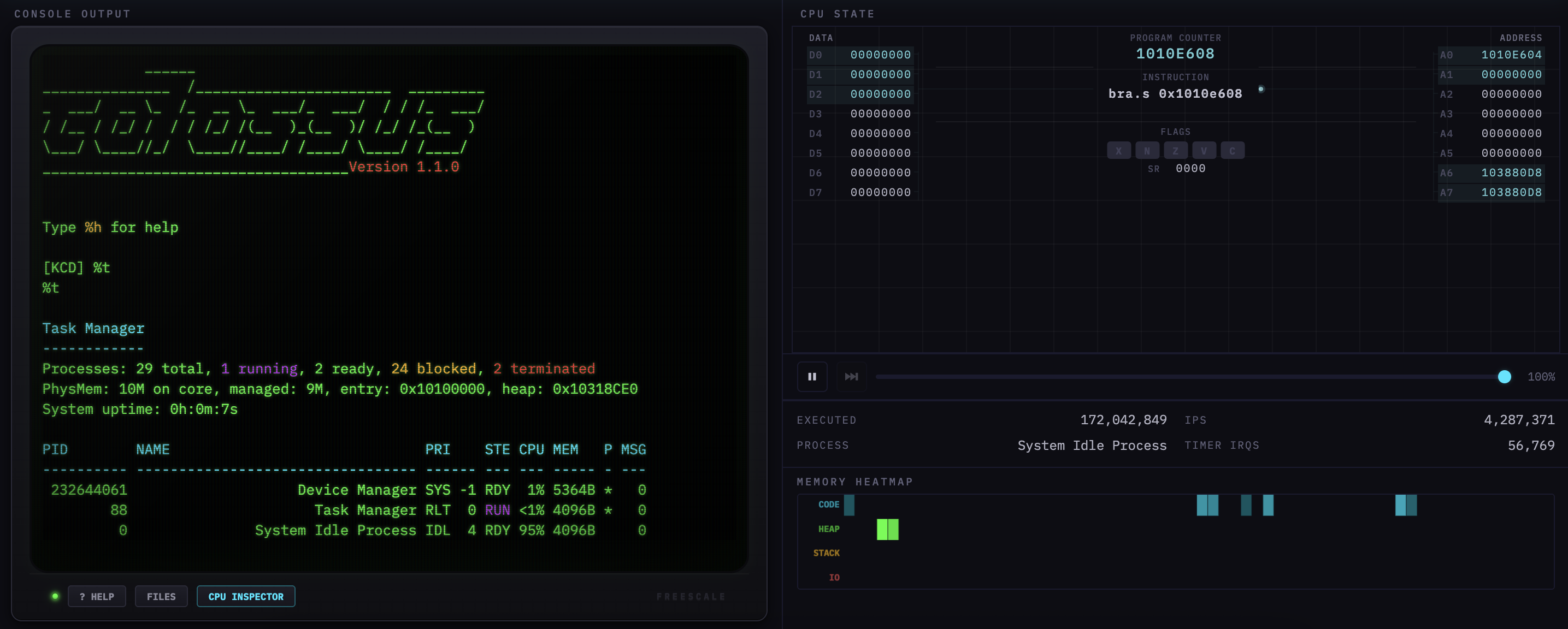
Once the context switch was working, all 20 system processes lit up: the task manager, the wall clock, the timing calibration service, the UART driver, the CRT display process, the keyboard command decoder. After almost two decades, the IPC chain came alive: cprintf sent messages through the I/O subsystem to the CRT display process (CathodeRayTube.cpp), which wrote to the UART. With the full chain working for the first time, the ASCII boot logo appeared with the [KCD] prompt.
The Final Stretch
With Colossus fully booting, a few last-mile issues remained. The Timing Calibration Service (Calibrator.cpp) runs at boot with ultra-high priority to measure IPC latency. It saves and restores the hardware timer period by reading the Timer Reference Register (TRR). My emulator was returning 0xFFFF as a default for all unhandled I/O registers, so the calibrator would save 0xFFFF, do its measurement, then restore 0xFFFF as the timer period. This broke the timer for the rest of the session. The fix was making TRR return the actual programmed value.
But the bigger remaining problem was input. The [KCD] prompt printed fine, but typing did nothing. On real hardware, keyboard input comes through the UART: characters arrive as interrupts, the UART driver reads them, and the Device Manager forwards them via IPC to the Keyboard Command Decoder (KCD). Emulating that full path would have required getting interrupt timing exactly right. Instead, I built a shortcut by having the emulator directly inject characters into KCD’s message queue in RAM, creating properly formatted KCDPacket objects with the correct vtable pointers and source process fields. When KCD is blocked waiting for input, the emulator writes the message pointer into its saved D0 slot on the stack, which is exactly how the kernel itself unblocks a process. When KCD gets scheduled, it sees the character and processes it normally. This required reverse-engineering KCD’s message format and the kernel’s unblocking mechanism from source, but it works reliably. With input working, the emulator was fully functional, with all the original commands like %T (task manager) and the ECE 354 test suites (%X, %Y, %Z) running correctly.
Into the Browser
By this point the emulator was a 14,000-line Python file on my laptop. I decided to put it on the web by using Pyodide (CPython compiled to WebAssembly) to run the emulator unchanged in a Web Worker and adding a front-end via xterm.js styled as a green phosphor CRT (complete with scanlines, glow, and chromatic aberration) and a canvas CPU visualization showing live register state. It worked, but the Python to WebAssembly to JavaScript chain was anemic, producing about 300K instructions per second.
Then I had a crazy idea. I asked Claude to port the whole emulator from Python to JavaScript. It took a few days of iteration and debugging, since the JS port had its own issues with carry flags, UART emulation, and the like, but it worked! With V8’s JIT, the emulator hit ~4M IPS.
That same week I used Claude to port the kernel source from GCC 3 to GCC 15, recompiling the binary for the first time in almost two decades. This kicked off the most satisfying part of the whole project: going back and methodically removing every hack the Python emulator had accumulated. GCC 15 shuffled addresses around, exposing dozens of hardcoded interceptions and memory overrides that had been workarounds for real bugs, intended just to keep things moving. I replaced the write() hack with proper UART TX interrupt delivery and swapped all hardcoded addresses for symbol table lookups. The emulator could now run both the original 2008 binary and the freshly compiled 2026 binary without changing a line.
Extending the OS
With a working emulator and a revived toolchain, I could finally extend the OS itself. With AI, coding progressed much faster than 2008 despite being solo. Within a week I had our old wishlist implemented: a RAM filesystem (32 files, 8 KB each, 7 new syscalls), a text editor, a calculator, Snake. Then I kept going, adding a BASIC interpreter (GOSUB/RETURN, FOR/NEXT, all the classics), a Z-machine interpreter running Zork, and a Colossus SDK supporting loadable C programs with ELF upload so you can drag-and-drop binaries from the browser.
And then, because the chain of absurdity wasn’t long enough, I went full meta and added an LLM. I started from Karpathy’s llama2.c, which is a minimal C inference engine for the Llama architecture. The smallest model that can produce coherent English is his stories260K, a 260K-parameter model trained on TinyStories. Even 260K parameters is 407 KB of weights, which is a lot for an embedded system from the 1990s, but it fits.
The first attempt was a naive FP32 forward pass. The ColdFire has no FPU, so every float operation goes through GCC’s software emulation in libgcc. That alone meant about 25 million software float ops per token, which results in roughly a billion emulated instructions. That was definitely not going to work and also revealed an issue with the emulator’s ADDX instruction which needed fixing.
It became clear the model needed quantization. Instead of storing each weight as a 32-bit float, you scale each row of the weight matrix so the values fit into 8-bit integers, retaining a single float scale factor per row. At inference time, the matmul inner loop becomes pure integer arithmetic (acc += (int32_t)wq[j] * (int32_t)xq[j]) and then you multiply by the scale factor at the end. That takes the hottest loop from ~100 emulated instructions per multiply-add down to just six. I had AI write a quantization script that converts the float weights offline, so the binary only carries INT8 weights and scale factors. Then, for the remaining float math outside the matmul (softmax, RMSNorm, RoPE rotations), I went old school, using Carmack’s legendary inverse square root from Quake for sqrtf and precomputed lookup tables for the 256 unique RoPE rotation values, eliminating all runtime trig.
Even with such a small model and aggressive quantization, the embedded weights plus the inference state blew past the heap boundary, so I shrunk the kernel stack from 16 MB down to 1 MB to make room (the kernel only uses about 4 KB in practice).
I thought the quantized 260K model would be lobotomized, but it actually produces story-like English. A glorious ~2-4 seconds per token running on an 18-year-old RTOS, running on an emulated 1990s embedded CPU, running in your browser.
Time Capsule
This months-long odyssey was a trip down memory lane for me. The original source is full of artifacts from 2008: Visual Studio projects, SVN metadata, a bundled copy of Tera Term, random FORTRAN 77 test files, and references to Beardor, our lucky mascot. One of the comments reads: “You are not expected to understand this.” This may have been true before, but with AI, nothing is beyond comprehension anymore.
You can try Colossus yourself at rtos.mironv.com. Give both the updated 2026 binary and the original unmodified 2008 version a try. Type %t to see the task manager, %ws12:00:00 to start the wall clock, %b to write BASIC, %z minizork.z3 to play Zork, and %a to watch a language model hallucinate stories on emulated 1990s hardware.